

JILICrown App – Secure Login and Fast Gaming Access
Want to play Jilicrown on your phone? Here is a quick and easy guide to help you download and install the Jilicrown App on both iOS and Android. Follow the simple steps to complete the setup, discover the main benefits of using the app, and learn how to fix common installation issues.
How to Download the Jilicrown App on iOS
For iOS users, the installation process requires a few extra steps to ensure proper setup. Follow the detailed instructions below to download and install the Jilicrown App safely on your iPhone or iPad.
Step 1: Access from the Jilicrown Interface
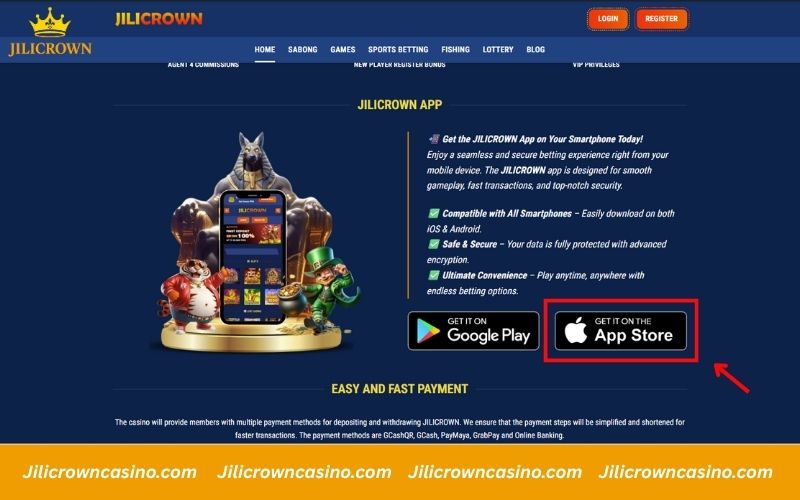
On the Jilicrown main page, locate the “Get it on the App Store” button displayed under the App section. Tap this button to be redirected automatically to the official website for download.
Step 2: Scan the QR Code on the Official Website
After reaching the official homepage, click the Mobile tab in the top menu to open the download section. You will see a QR code labeled for iOS. Use your phone’s camera to scan it, and the download will begin automatically.

Step 3: Allow the Download and Open Settings
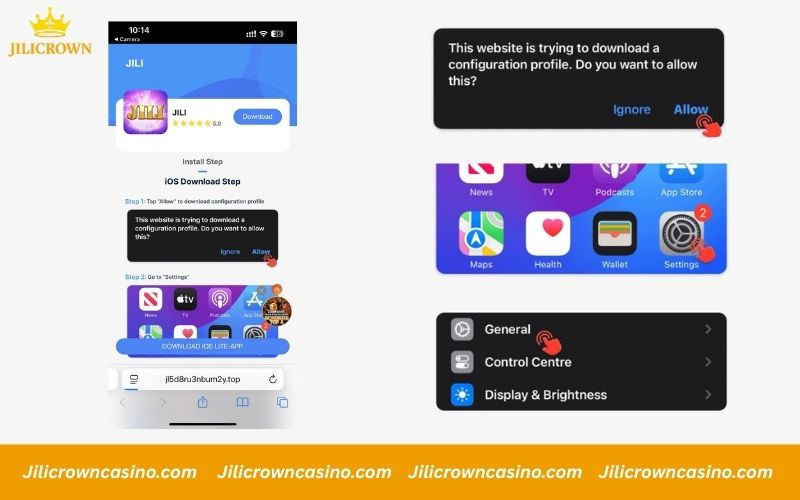
After scanning the QR code, a message will appear asking if you want to download a configuration profile. Tap Allow to proceed. Once the file is downloaded, open your device’s Settings app, then go to General to prepare for the installation in the next step.
Step 4: Install and Verify the Configuration Profile
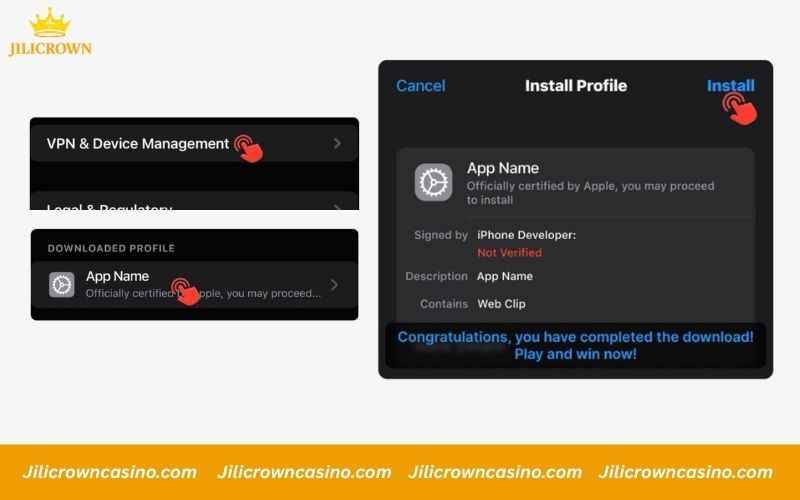
In your device’s Settings, go to General > VPN & Device Management. Under the Downloaded Profile section, tap the profile labeled with the app name, then press Install in the top-right corner to complete the setup. After installation, return to the home screen and open the app to start using it smoothly.
How to Download the Jilicrown App on Android
The installation steps for Android are almost the same as for iOS, with only a few minor differences. Follow the instructions below to complete the download and setup process smoothly.
Step 1: Tap the Google Play Button on the Homepage
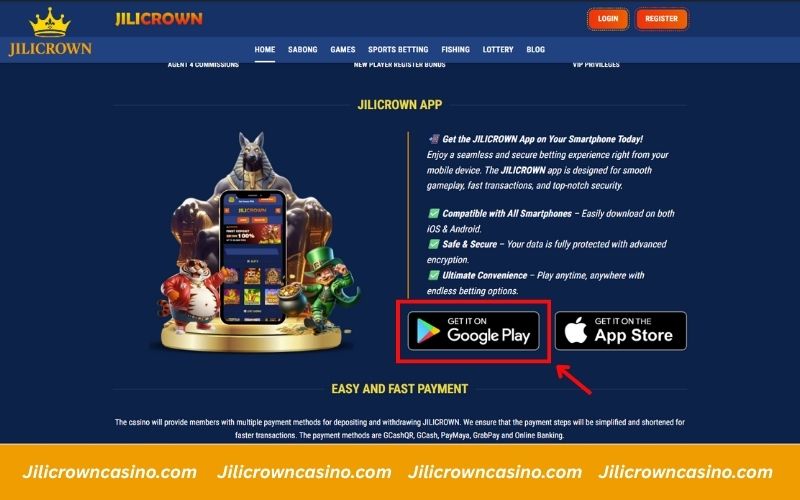
On the Jilicrown main page, scroll to the App section and tap the Get it on Google Play button. This will redirect you to the official Android download page, where you can safely install the latest version of the app on your device.
Step 2: Scan the Android QR Code
After being redirected to the official website, click the Mobile tab in the top menu. A new section will appear showing two QR codes. Use your phone’s camera to scan the one labeled for Android, and the download will begin automatically.

Step 3: Confirm the Download
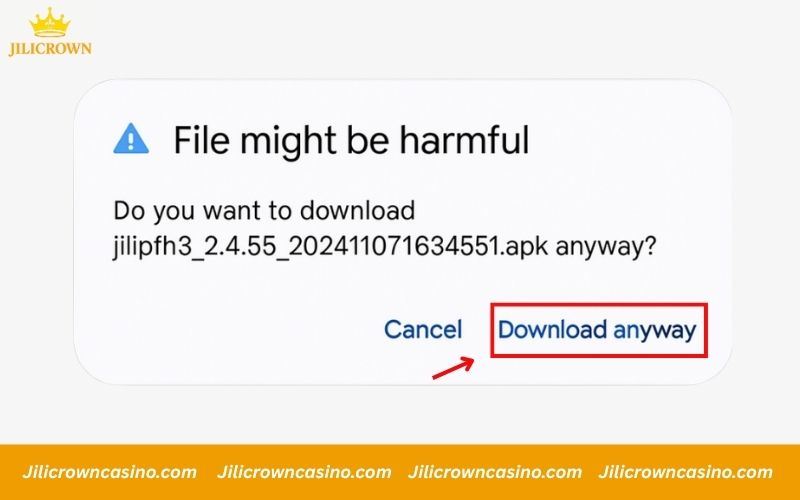
Once the download prompt appears, your device may display a warning message saying the file might be harmful. This is a standard Android security notice for APK files. Tap Download anyway to continue. The file is completely safe and verified from the official Jilicrown source.
Step 4: Install the Application
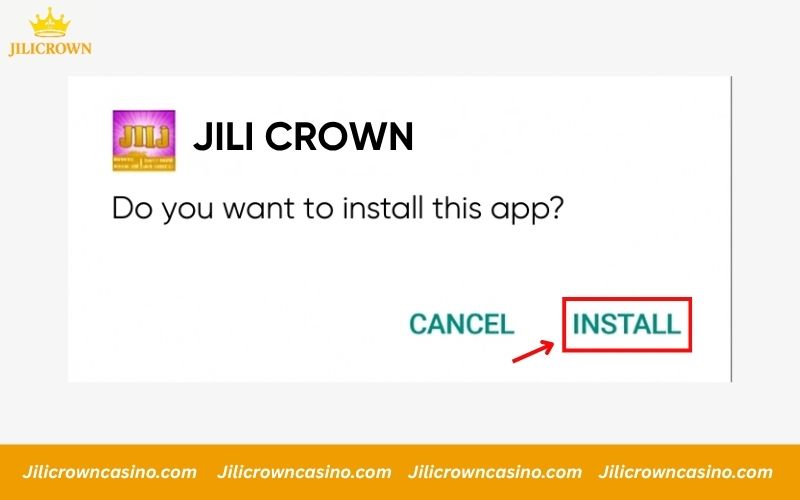
After the file finishes downloading, open it from your notification bar or file manager. A prompt will appear asking if you want to install the application. Tap Install to begin. Wait a few moments for the process to complete.
Important Notes for Jilicrown Installation
To ensure a smooth and safe installation process, players should keep a few key points in mind. Following these simple tips will help you avoid errors or connection issues during setup and enjoy the best experience with the Jilicrown App.
- Access the official website only: Always make sure you visit the official Jilicrown homepage to download the app. Avoid clicking on unknown links or third-party sources that may lead to fake or unsafe versions.
- Check your device compatibility: Before installing, confirm that your device has enough storage space and the latest software updates to support the app properly.
- Use a stable internet connection: A strong and steady connection is essential when downloading. Avoid using public Wi-Fi or unstable networks to prevent interruptions during installation.
- Allow required permissions: During setup, Jilicrown may request access permissions such as notifications or storage. Grant these permissions to ensure the app functions correctly.
Benefits of Playing Jilicrown via the App
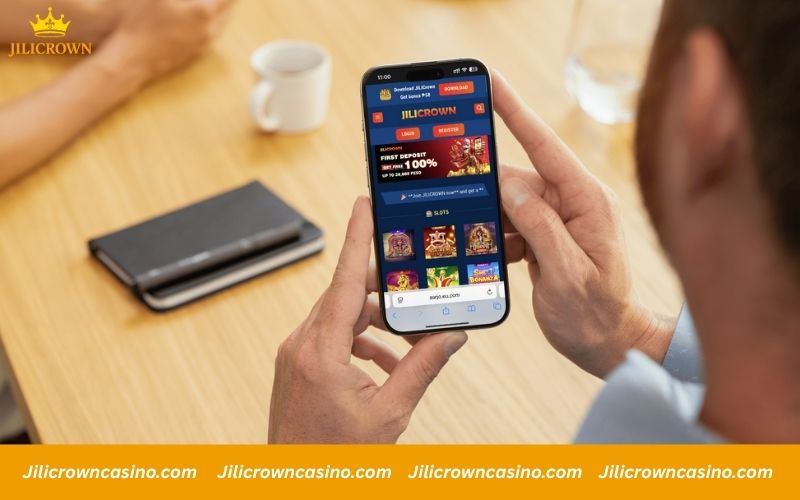
Using the Jilicrown mobile app offers a more convenient and optimized experience compared to playing through a browser. Here are some of its main advantages:
- Smoother gameplay experience: The app is optimized for mobile devices, delivering faster loading times and more stable performance than browser play.
- Instant event and bonus updates: Players receive real-time notifications about new promotions, tournaments, and offers directly through the app.
- Enhanced account security: The Jilicrown app supports two-factor authentication (2FA) and secure login protocols to protect your personal and financial data.
- Quick customer support: In-app assistance allows you to contact support instantly for help with deposits, withdrawals, or gameplay issues.
- Play anytime, anywhere: With the app installed, you can access all games and features on your phone or tablet no matter where you are.
Fixing Common Download Issues
If you experience any issues during the Jilicrown App installation process, try the quick fixes below to resolve them easily.
- App not downloading: Check your internet connection and ensure it’s stable. If your device storage is full, delete unnecessary files or apps, then restart your device and try downloading again from the official Jilicrown website.
- Installation error: Clear your browser or app cache before reinstalling. Make sure your device has enough available space and is updated to the latest system version.
- App not opening after installation: Confirm that all required permissions are granted in your device settings. If the issue continues, uninstall the app and reinstall it using the official download link.
- App blocked by system security: On Android devices, enable the option Install apps from unknown sources in your settings. For iOS users, go to Settings > General > Device Management and allow the app to run normally.
Conclusion
Installing the app on your device provides a smoother and more stable gaming experience. To avoid errors, always download the Jilicrown App from the official website and follow the setup instructions carefully. If any issue occurs, apply the troubleshooting steps above or contact the support team through the in-app help center.