

JILICrown Deposit – Secure Payment Options Available
For first-time users, choosing the right payment method and applying bonuses can feel a bit overwhelming. This step-by-step guide explains the Jilicrown Deposit process clearly, helping you complete your first top-up effortlessly and jump straight into the gaming experience with confidence.
Steps for Jilicrown Deposit into Your Account
To ensure a safe and seamless experience, always access the official Jilicrown website before making a payment. This walkthrough explains the Jilicrown Deposit process clearly so you can fund your account without confusion and start enjoying the platform immediately.
Step 1: Open the Deposit Menu
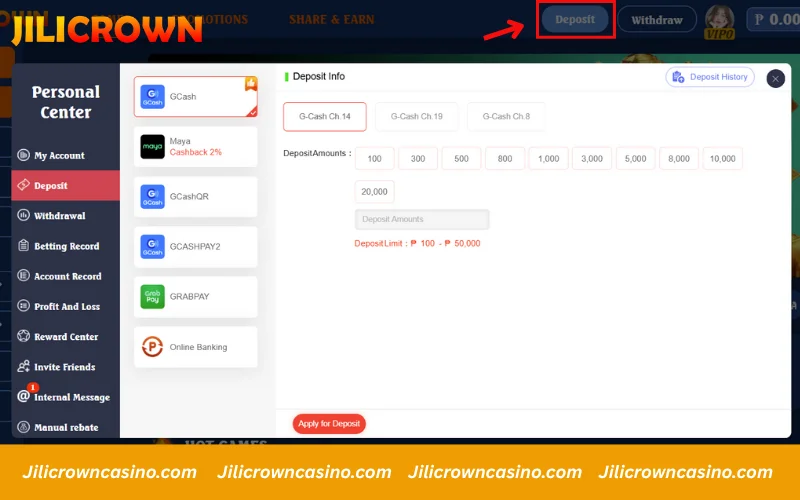
On the Jilicrown homepage, look to the upper-right corner and tap the Deposit button highlighted in blue. This will take you directly to the deposit panel.
Inside the Personal Center on the left side menu, you’ll also see a Deposit tab. Selecting either option will open the Jilicrown Deposit screen where you can choose your preferred payment method.
Step 2: Select your Deposit Method
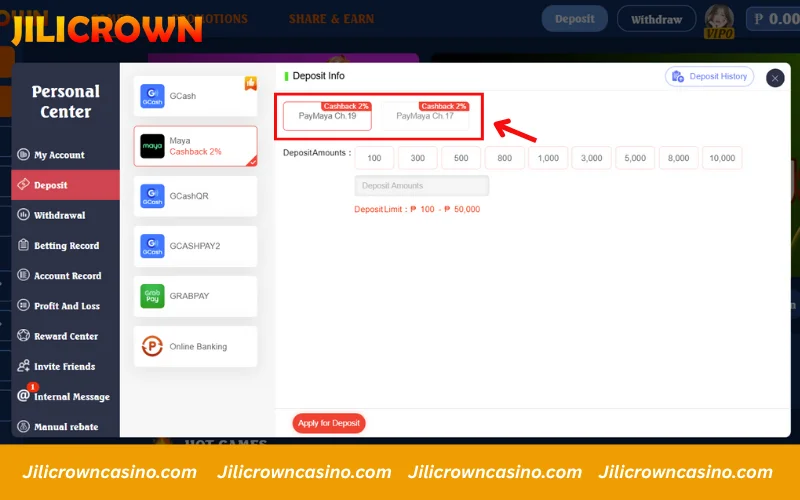
On the Jilicrown deposit screen, you can choose from multiple payment channels such as GCash, Maya, GCash QR, GrabPay, or Online Banking. For players looking to maximize value, Maya is recommended when available because certain Maya channels offer a 2% cashback bonus, as highlighted on the screen. Simply tap your preferred payment method to continue.
Step 3: Choose how much you want to add
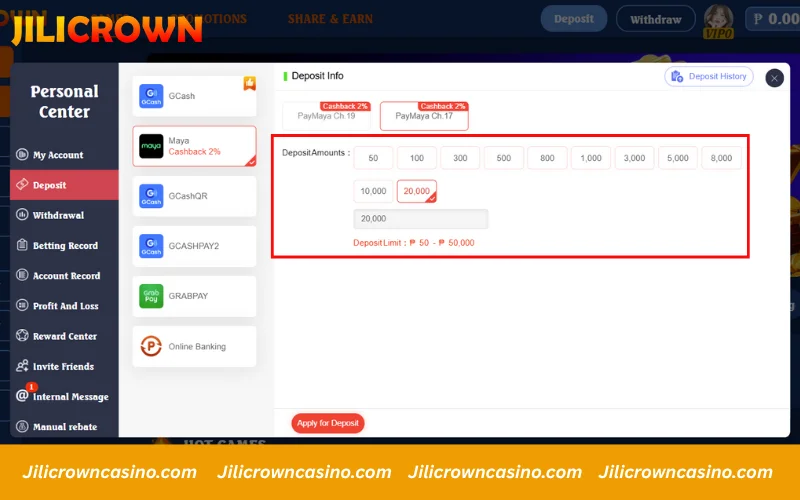
Once your payment method is selected, decide the amount you want to add to your account. Jilicrown lets you tap a preset value or manually enter your exact deposit amount.
You can load funds starting from ₱50 up to ₱50,000, giving you full flexibility based on your playing style.
Step 4: Confirm and Complete your payment
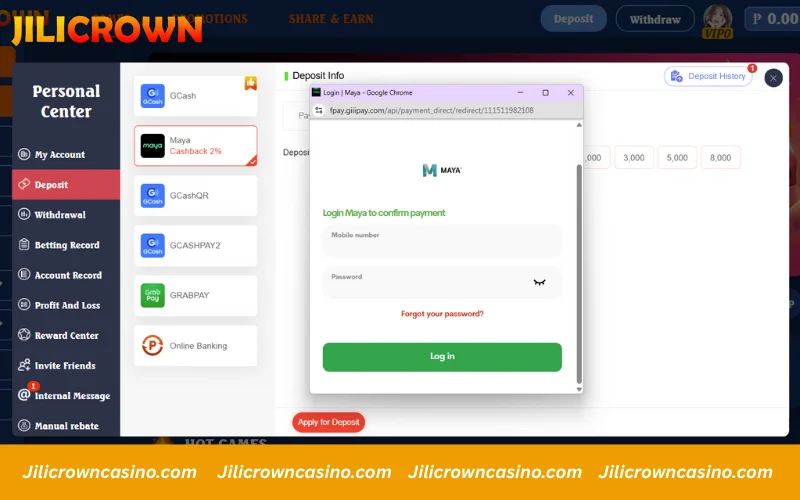
After entering your deposit amount and clicking Apply for Deposit, Jilicrown will redirect you to the payment window. If you select Maya, a secure Maya login page will appear. Enter your details and confirm the transaction to complete your deposit.
How to resolve deposit issues
Deposits at Jilicrown normally go through instantly, but if a problem occurs, use the guide below to resolve it quickly:
|
Issue |
How to Solve |
|
Payment deducted but balance not updated |
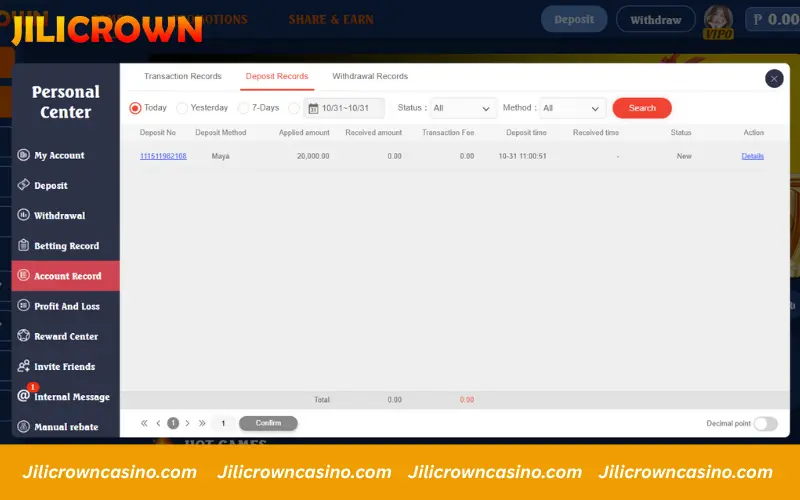
Check Deposit Records. If payment succeeded but balance did not update, contact Jilicrown Support with screenshot, receipt, and transaction reference. |
|
Incorrect amount or details entered |
Message Customer Service right away and provide the correct details for verification and correction. |
|
E-wallet / bank channel issues (GCash, Maya, GrabPay, Bank) |
Check if your payment app is running normally. If it’s working but the payment fails, contact Jilicrown Support for assistance. |
|
Deposit interrupted mid-transaction |
Reconnect and try again. If you were already charged, send proof of payment to support for manual review and crediting. |
Important Guidelines for a Safe Jilicrown Deposit
To ensure every Jilicrown Deposit is successful and secure, take a moment to follow these tips. They help safeguard your funds, minimize errors, and make your deposit experience fast and stress-free on the platform.
- Verify your account before depositing: Make sure your phone number and account info are verified. Verified users enjoy a smoother experience and access to cashback or bonuses when offered.
- Deposit only through official channels: Use payment methods inside the Jilicrown cashier page only. Never transfer funds to personal accounts or unofficial links.
- Check payment details before confirming: Review the amount and selected payment method carefully to avoid transaction mistakes or delays.
- Be patient with processing time: Deposits usually reflect instantly, but some bank or wallet channels may take a short moment to process. This is normal.
- Save transaction confirmation: Keep a screenshot or payment reference for every deposit. It helps verify and credit your funds quickly if needed.
Jilicrown Deposit Bonuses for New Players
To welcome new members, Jilicrown offers multiple deposit rewards that boost your initial balance and give you more playtime right from the start. Each bonus is designed to help you explore games with a larger bankroll and increase your winning potential from day one.
Below are the current deposit promotions available for new Jilicrown users:
|
Bonus Level |
Bonus Offer | Maximum Reward | Eligibility |
|
First Deposit Bonus |
100% bonus on first deposit |
Up to ₱28,888 |
New members’ first deposit |
|
Second Deposit Bonus |
68% bonus |
Up to ₱16,888 |
New members’ second deposit |
| Third Deposit Bonus | 38% bonus | Up to ₱12,888 |
New members’ third deposit |

FAQs about Jilicrown Deposit
Can I deposit using another currency?
Yes. Deposits are accepted in PHP, and if you use another currency, your payment channel (e.g., e-wallet or bank) will convert it automatically based on the exchange rate.
Are there any deposit fees?
Jilicrown does not charge fees for deposits. However, some banks or e-wallets may apply minor service fees depending on their policies.
Will bonuses be applied automatically?
Certain bonuses, such as the first-time deposit offer, may be applied automatically, but others require manual selection on the Promotions page. Review each bonus before confirming your deposit.
I sent the deposit to the wrong account or channel – what now?
Do not send another payment. Contact Jilicrown Support right away and provide your reference number, payment screenshot, and deposit time so the team can help verify and recover the transaction if possible.
Conclusion
This guide has shown how to complete your Jilicrown Deposit securely and easily. Before depositing, remember to check active bonuses to maximize your benefits. If you need immediate help, reach out to Jilicrown via Live Chat or Hotline.