

JILICrown Register – Join and Win at the Top Casino
If you’re new to the platform and unsure where to begin, don’t worry. This walkthrough will guide you through the Jilicrown Register process so you can open your account quickly and safely. Following this step-by-step guide ensures a smooth start and secure access to all Jilicrown features.
How to complete the Jilicrown Register process
Signing up on Jilicrown only takes a few minutes. First, confirm you’re on the official website. From the homepage, hit Register to launch the secure sign-up form. Enter your details and follow the on-screen instructions to complete the process.
Step 1: Locate the “Register” button
Go to the Jilicrown homepage and look at the top-right menu. Click the Register button (light-blue) to open the secure sign-up form.

Step 2: Complete the sign-up form
A registration pop-up appears. Enter Username, Password, Confirm Password, Mobile Number, and the Captcha shown. Tick the box that states “I confirm that I am 18 years old and I have read the Terms and Services.” Then click the Register button (blue) to proceed.

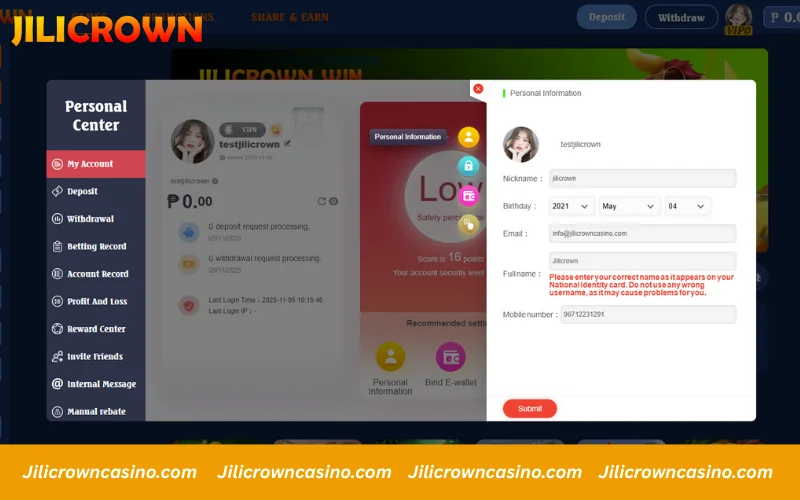
Step 3: Update your personal information
Once your account is created, head to Personal Center > My Account. Enter your nickname, pick your birth date, fill in your email address, full name, and mobile number. Make sure all details match your official ID to avoid verification issues later, then click Submit to save your profile.
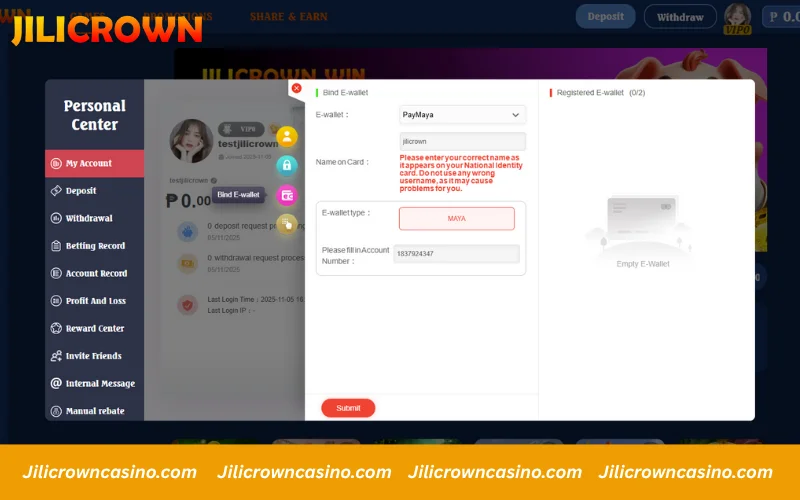
Step 4: Link your e-wallet
To enable withdrawals, open Personal Center → My Account → Bind E-wallet. Choose your payment option (ex: PayMaya), enter the name on the card, select wallet type, and input your account number. Double-check your information, then click Submit to save the wallet.
What to know before creating your Jilicrown account
Before you begin the Jilicrown Register process, review the following key points to avoid verification issues and ensure smooth gameplay, deposits, and withdrawals. Preparing these details in advance helps you create your account faster and more securely.
Use accurate personal details
When completing your Jilicrown Register form, make sure to provide true and correct information. Your full name, phone number, and other details must match your government-issued ID. This allows for faster security verification, withdrawal approvals, and easy account recovery when needed.

Provide a valid mobile number
Use an active phone number that you can access anytime. During the Jilicrown Register process, the system will use this number for OTP verification, password recovery, and important notifications related to your account.
Confirm you are 18 or older
Only players who are 18+ can create an account and play on Jilicrown. If incorrect age information is provided, your access may be limited to maintain a safe and legal gaming environment.

Keep your login private
Never share your username or password with anyone. Keeping your credentials confidential protects your balance and personal data from unauthorized access. Once your Jilicrown Register setup is complete, maintaining privacy is key to account security.
Register from your personal & secure device
When signing up, make sure you are using your own mobile phone or computer. Avoid logging in from shared devices to protect your privacy and avoid unauthorized access to your account.
Avoid using VPN when registering
Do not activate VPN or IP-changing tools while performing your Jilicrown Register steps. The system may detect irregular network activity and delay or block your account approval. Registering from your real connection ensures faster and safer verification.

Enjoy Bonus & Angpao After Joining Jilicrown
New users who sign up and download the official Jilicrown app can receive a registration bonus up to 188 PHP and an angpao reward up to 688 PHP. This promotion is exclusive to first-time members and must be claimed within 2 hours after registration and app install.
The reward follows a 20x turnover requirement, and can only be used on slot and fish games, ensuring a fair and secure play environment.

FAQs about Jilicrown Register
Do I need to verify my Jilicrown account right after signing up?
Verification is not mandatory right after completing your Jilicrown Register process, but doing it early helps unlock faster withdrawals, smoother deposits, and access to exclusive promotions.
Can I change my registered mobile number later?
Yes. You can update your number anytime in the Personal Center under My Account, then verify it through SMS before using it for transactions.
Can I create a Jilicrown account with Facebook or Google?
Yes. If available in your area, Jilicrown supports quick registration via Facebook or Google for instant login.
Can I use the same mobile number for multiple Jilicrown accounts?
No. Each phone number is limited to one account to maintain fair play and user security across the Jilicrown Register system.
What if I entered incorrect information during registration?
Please reach out to Live Support immediately. Avoid making duplicate accounts, as it may lead to permanent restrictions or the loss of promotional eligibility.
Why didn’t I receive the confirmation email after registering?
Check your Spam or Promotions folder. If you still don’t receive it, contact Live Support to verify your email address manually.
Conclusion
By now, you should have a complete understanding of how to finish the Jilicrown Register process and unlock the exclusive welcome rewards available to new members. Once your account is set up, make your first deposit and explore the wide selection of slot and fishing games offered on Jilicrown. Each reward gives you a strong head start and boosts your early gameplay experience. If you need any assistance, Jilicrown Live Support is available 24/7 to help with registration, deposits, or any other account-related concerns.