

JILICrown Withdrawal – Safe Payouts for Real Winnings
You’ve earned your winnings on JiliCrown and now it’s time to cash out. The JiliCrown Withdrawal process is simple, and this guide will help you withdraw smoothly without errors. Follow each step carefully to ensure fast and secure transactions.
How to Withdraw Funds on JiliCrown
To help you cash out smoothly, here is a clear step-by-step guide. Follow each instruction carefully to avoid errors and ensure your withdrawal is processed quickly and securely.
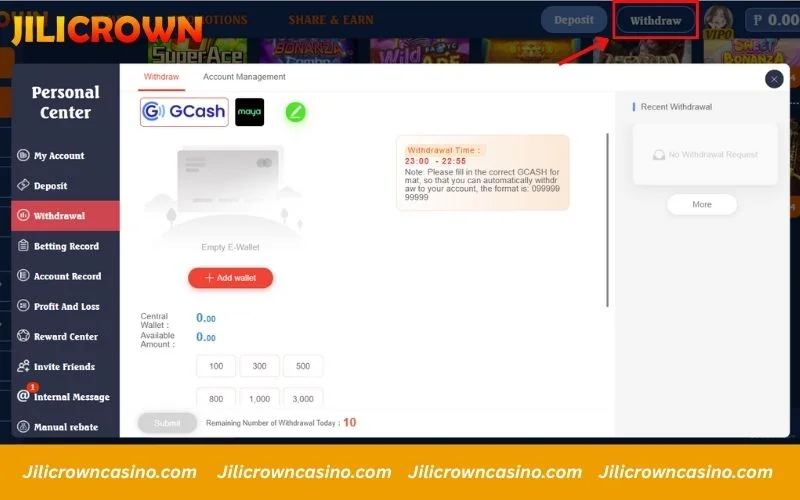
Step 1: Go to the Withdrawal Section
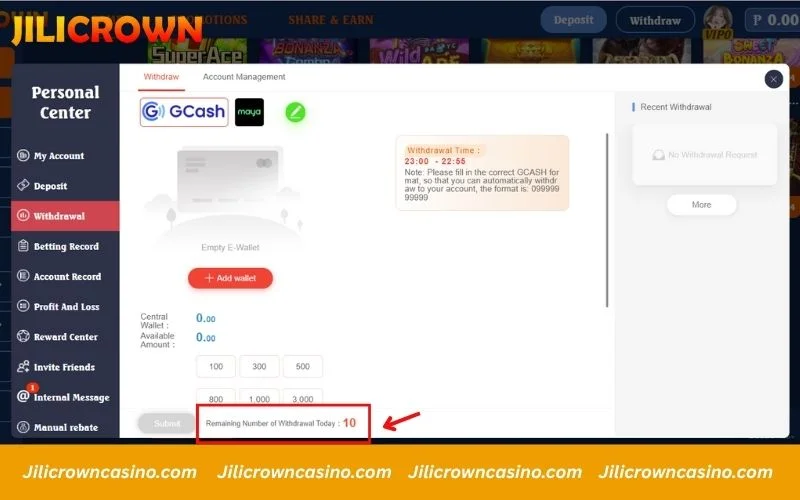
On the main dashboard, tap Withdraw located at the top right of the screen. You will be directed to the withdrawal page where you can select your preferred e-wallet such as GCash or Maya. Once selected, proceed to the next step and enter your withdrawal details.
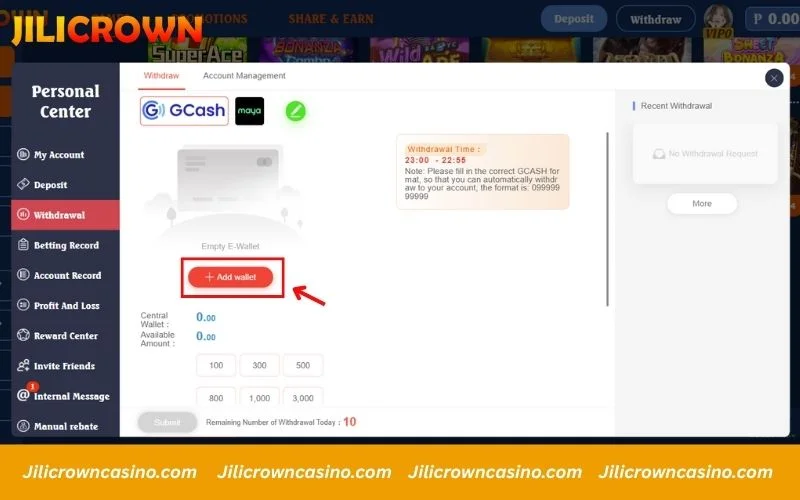
Step 2: Add your withdrawal wallet
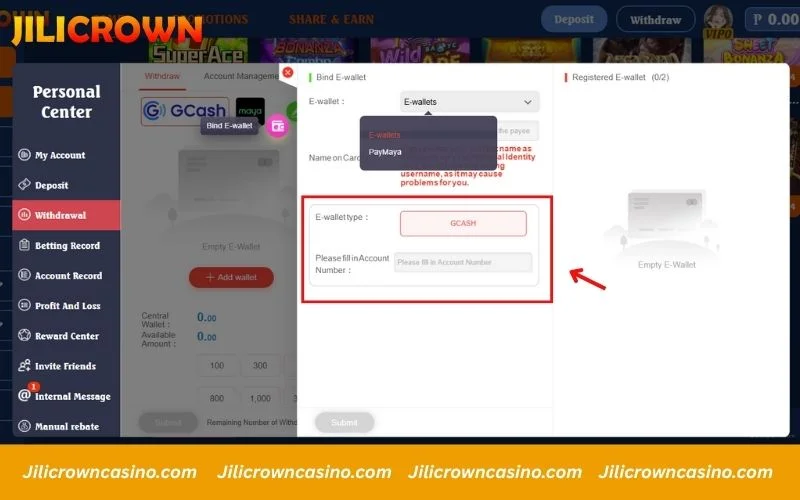
At JiliCrown, you can withdraw funds through supported e-wallets like GCash and Maya. If you haven’t linked a payout wallet yet, simply click the Add Wallet button in the withdrawal screen. Enter your correct wallet details to ensure smooth and automatic processing.
Once completed, your payout method will be saved for future transactions, making withdrawals faster the next time.
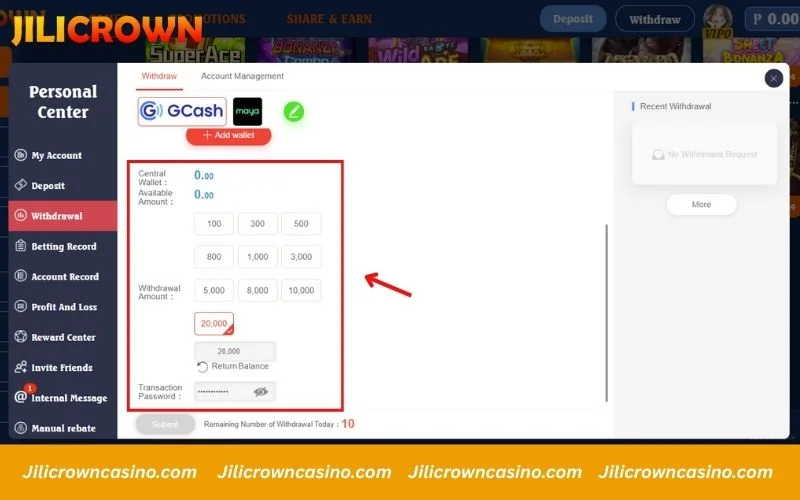
Step 3: Enter withdrawal amount and confirm your password
Choose the amount you want to withdraw by selecting one of the preset values or typing a custom number into the Withdrawal Amount box. Once done, enter your Transaction Password to verify your request. After confirming everything is correct, click Submit to proceed with your withdrawal.
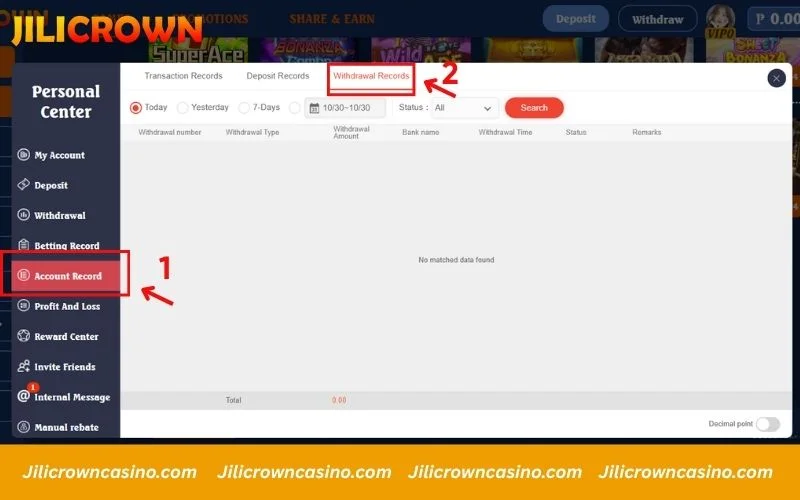
Step 4: Track your withdrawal history
Once your request is submitted, you can monitor its progress directly in your account area. Go to Account Record on the left menu, then select Withdrawal Records at the top. Here, you’ll see all withdrawal details including time, status, and transaction notes. This section helps you stay updated so you know exactly when your funds are processed.
Important tips to ensure a smooth withdrawal
Before requesting a withdrawal on JiliCrown, make sure you follow the key guidelines below to avoid delays and ensure a smooth, secure cash-out process. These tips help you withdraw with full confidence and zero complications.
- Withdraw during regular banking hours: Although JiliCrown supports 24/7 withdrawals, bank operating hours usually result in faster processing. Requests made late at night or during holidays may take longer depending on banking schedules.
- Withdraw to your own registered account: For safety, withdrawals must match the account details registered on your JiliCrown profile. Transfers to third-party accounts may be blocked for security reasons.
- Clear any bonus requirements: If you used any promotions, make sure all wagering requirements are completed before submitting a withdrawal request to avoid delays.
- Daily withdrawal limit: JiliCrown allows multiple withdrawals per day (as displayed in your withdrawal page). Check the “Remaining Withdrawal” indicator to stay within the allowed limit.
FAQs about JiliCrown withdrawal
Wondering how withdrawals work at JiliCrown? Below are clear answers to the most common questions players ask, helping you cash out smoothly and with peace of mind.
How long does a JiliCrown withdrawal normally take?
Most withdrawals at JiliCrown are completed within 1 to 5 minutes, depending on the method and system status. During peak hours or rare network delays, it may take up to 30 minutes, but processing remains fast and secure overall.
Can I withdraw my winnings to GCash on JiliCrown?
Yes, JiliCrown fully supports GCash withdrawals. Simply go to your E-Wallet section, link your GCash number, and use it when cashing out. When requesting a withdrawal, choose GCash, enter your desired amount, and submit to complete the process.
How can I confirm if my JiliCrown withdrawal was successful?
To verify the status of your withdrawal, go to Account Record > Withdrawal Records in your profile. Once your request is processed, you’ll see the status updated instantly and may receive a success notification on the screen.
Can I withdraw using PayPal or other e-wallets on JiliCrown?
Currently, JiliCrown processes withdrawals via GCash only. PayPal and other e-wallets are not supported at this time.
What should I do if I forget my transaction password?
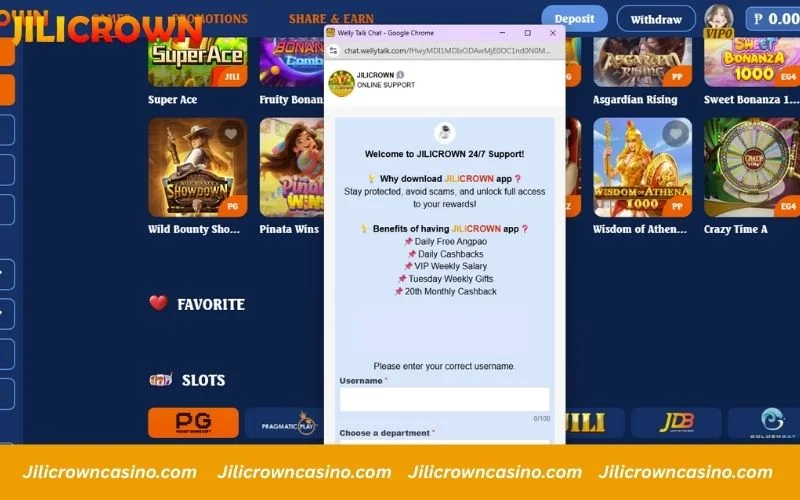
If you can’t recall your transaction password, contact the JiliCrown support team through live chat, Telegram, Facebook, or the hotline. Using the live chat option is recommended for the fastest resolution, as their agents can assist you instantly.
Conclusion
JiliCrown offers a streamlined and secure withdrawal system designed for fast cash-outs. With this clear step-by-step guide, you can now withdraw confidently and avoid delays. If you ever need help, the support hotline and live chat team are available 24/7 to assist you.